Google search operators worth learning, and the ones that died
The most powerful part of Google search is the part it never tells you about.
Google's own help page documents five search operators. Google understands about a dozen more, mentions none of them, and retired one of the famous ones in 2024 without telling anyone. Here is what still works.
They all go in the ordinary search box. Put no space after the colon, or Google reads the operator as a plain word and quietly searches for that instead.
| Type this | And you get |
|---|---|
| site:bbc.co.uk budget | Only pages from that site or domain |
| "the pale blue dot" | Those words, in that order |
| jaguar -car | The animal, mostly |
| filetype:pdf tax guide | PDFs and nothing else |
| after:2025-01-01 rust async | Nothing published before that date |
| intitle:changelog | The word in the title, not just somewhere on the page |
| (vinyl OR records) shop | Either word counts |
| tesla AROUND(3) recall | The two words within three words of each other |
The five Google will admit to
Quotes, the minus sign, site:, filetype:, and the before:/after: pair. That is the entire official list, and most people already half-know all five.
site: is the one to learn first. It hands Google's index to any site whose own search box is bad, which is most of them. Try site:gov.uk passport renewal and compare it to searching the same thing on the site itself.
The ones it won't
intitle:, inurl: and intext: control where a word has to appear. A word in the title usually means the page is about that thing. The same word buried in the body often means it is not.
AROUND(3) is the strangest of them. It finds two words within three words of each other. That lets you search for a relationship, not just two keywords that share a page.
They fail silently, and they die quietly
Type "or" in lowercase and Google searches for the word or. Type around(3) in lowercase and it gets ignored completely. Nothing warns you. You get worse results and no reason why.
Undocumented also means removable without notice. cache: was retired in 2024 after roughly two decades. related: went in 2023, and link:, info:, + and ~ are all long gone. Some of what you learned about Google search is now just words in a box.
What we did about this in dashi
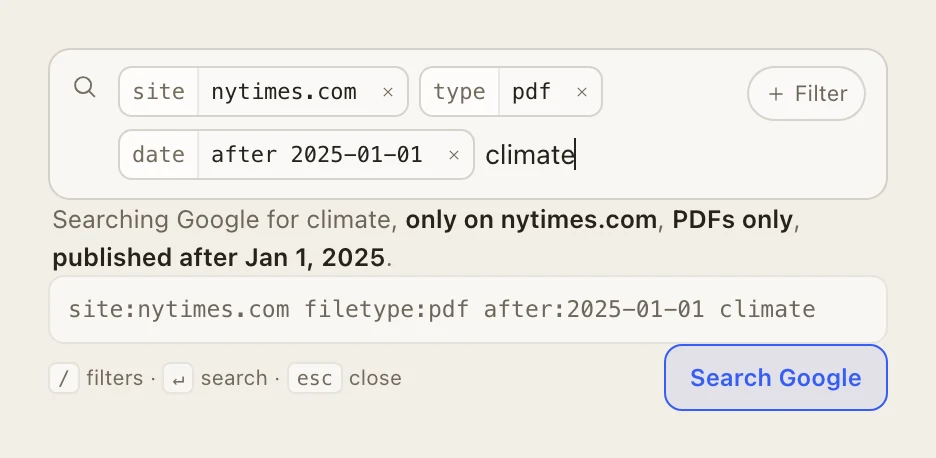
We put the same list in dashi's search bar and wrote it in English. Press / on a new tab, choose "Search with filters", then pick from "Only this website", "File type" or "Published after". No colons, no capitals, nothing to memorise.
The query assembles itself as you click. You get a sentence describing what you asked for, and the real operator string underneath it, both editable. Paste an operator string in and it comes apart into pills.
Plain searches go to whatever engine Chrome is already set to, untouched. dashi only steps in when you ask it for a filter.